
Case Study: Eliminating Echo and Background Noise in OBS


The Challenge
A new podcaster reached out in frustration and booked a Live Diagnostic Call. She had invested in a MacBook, a Blue Yeti microphone, and had even installed acoustic wall panels around her desk to reduce room echo. Despite this, her audio in OBS was plagued by excessive background noise and a hollow, echoing sound. She had watched countless YouTube tutorials and added multiple noise reduction filters in OBS, but the changes only made her voice sound worse and digitally degraded.
The Amazing Audio Solution
We connected via Google Meet, and I used AnyDesk to securely access her Mac. To hear exactly what her microphone was capturing without the interference of OBS, we used a high-quality audio streaming plugin. The issue was immediately clear: we were dealing with a combination of incorrect physical settings and hidden operating system boosts.
- Bypassing Software Fixes: The first step was to turn off all the OBS audio filters she had applied from YouTube tutorials. You cannot fix a bad source signal with software; you have to fix the source itself.
- Correcting Digital vs. Hardware Gain: I discovered the physical gain dial on her Blue Yeti was turned all the way down to zero. To compensate for this extremely quiet signal, her Mac’s hidden Audio MIDI Setup was artificially boosting the input by a massive +18dB. This digital boost was dragging up the entire “noise floor,” making every hiss and hum aggressively loud. We removed the Mac’s digital boost and turned the physical microphone dial up to roughly 1 o’clock, instantly providing a clean, strong, noise-free signal.
- Fixing the Echo (Polar Patterns): Even with the acoustic panels, she was getting echo because her microphone was set to the wrong polar pattern. I guided her to switch the dial on the back of the mic to ‘Cardioid’, telling the microphone to only listen to the audio directly in front of it and ignore the reflections bouncing off the walls behind it.
- Microphone Positioning: Finally, we corrected her physical relationship to the microphone. She had been speaking into the top of the Blue Yeti, but it is a side-address microphone. We tilted it so she was speaking directly into the front logo.
The Result
The transformation was night and day. By fixing the hardware settings and removing the destructive digital boosts, the background noise vanished, and the room echo was eliminated. Her voice sounded rich, clear, and professional, completely removing the need for confusing OBS filters. She left the session with a full understanding of her hardware and the confidence to start recording her podcast.
Client Feedback
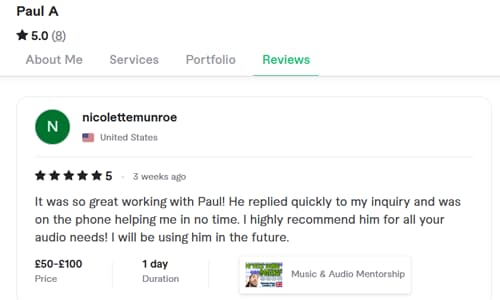
The client was thrilled to have her podcasting roadblock removed and left this wonderful review:
“It was so great working with Paul! He replied quickly to my inquiry and was on the phone helping me in no time. I highly recommend him for all your audio needs! I will be using him in the future.”
This article was originally published as a field case study on our sister site, Audio Support, and has been adapted for Amazing Audio.
Stop Fighting OBS Filters
Don’t try to fix hardware issues with software band-aids. Let our remote engineers diagnose your exact setup, optimize your gain staging, and give you a flawless, broadcast-ready sound.
Book a Live Diagnostic Call