
Case Study: Fixing a Rising Noise Floor on a Focusrite Scarlett


The Challenge
A voiceover artist building her new home recording studio reached out for help and booked a Live Diagnostic Call. She had invested in industry-standard gear—a Rode NT1-A microphone and a Focusrite Scarlett 2i2 4th Gen audio interface—but was hitting a major roadblock. Her recordings were plagued by an excessive background noise floor. Even worse, the noise wasn’t constant; the loud hissing sound would actually increase dramatically whenever she paused to take a breath or stopped speaking entirely.
The Amazing Audio Solution
We connected via a WhatsApp video call, and I used AnyDesk to view her Mac’s screen while routing her live microphone feed to my studio monitors using the AudioMovers plugin. Hearing the raw audio in real-time was crucial for diagnosing the issue.
- Ruling Out the Environment: First, we eliminated physical causes. She lived in a quiet rural area, and a quick video tour of her vocal booth confirmed there were no humming appliances, air conditioners, or power cables crossing audio lines to cause interference.
- Software vs. Hardware Diagnostics: We made test recordings using both TwistedWave and Audacity to rule out any app-specific glitches. I noticed a distinct visual pattern in the audio waveforms: the noise level visibly swelled up like a wave during the silent gaps between her words.
- Identifying Auto-Gain: This swelling effect is a classic symptom of automatic volume leveling (AGC or Auto-Gain). The system was trying to “help” by turning the volume up when she stopped speaking, which dragged all the microscopic room noise up to maximum volume.
- The Hidden Physical Solution: I opened the Focusrite Control 2 software on her Mac. We checked the Auto Gain, AIR, and SAFE settings. Surprisingly, even after appearing to disable Auto-Gain in the digital software, the rising noise remained. Through deep knowledge of the 4th Gen hardware, I realized the software control was bypassed; she had to press a specific physical button on the front panel of the Scarlett interface itself to truly defeat the auto-gain circuit.
The Result
The moment she pushed the physical button on the interface, the auto-levelling stopped. The swelling hiss completely vanished, leaving her with the crisp, clean, professional noise floor that the Rode NT1-A is famous for. By diagnosing this non-intuitive hardware quirk, we saved her the immense frustration of buying expensive noise-reduction plugins or attempting to return perfectly good equipment.
Client Feedback
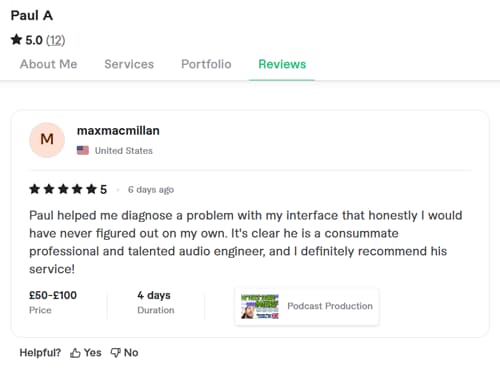
The client was relieved to have this elusive technical glitch solved and left this fantastic review:
“Paul helped me diagnose a problem with my interface that honestly, I would have never figured out on my own. It’s clear he is a consummate professional and talented audio engineer, and I definitely recommend his service!”
This article was originally published as a field case study on our sister site, Audio Support, and has been adapted for Amazing Audio.
Don’t Let Hidden Hardware Settings Ruin Your Takes
When software controls fail, you need an expert who understands the physical gear. Let our remote engineers diagnose your exact setup, optimize your interface, and eliminate background noise for good.
Book a Live Diagnostic Call