
Case Study: Diagnosing a Silent Headset Microphone
- Client
- A home recordist
- Setup
- Behringer HLC 660M headset, Cubase, Windows
- Problem
- Playback worked, but Cubase recorded nothing from the headset mic
- Fix
- Ruled out the software, then from a photo of the opened XLR plug we found a loose connection inside
The Challenge
A client reached out for one-to-one training because he was completely stuck with his recording software and booked a Live Diagnostic. He was using a Behringer HLC 660M headset, and while he could hear playback perfectly through the headphones, Cubase absolutely refused to record any audio from the attached microphone. Assuming he had misconfigured a complex internal routing setting or audio driver within his DAW, he wanted to get his studio back on track.
What I did
I connected to the client’s system remotely and immediately began running diagnostic checks on his digital signal path. I checked through all the likely causes in Windows and Cubase.
- Ruling Out the Software: After thorough testing, it became clear that his Cubase configuration was set up correctly. The software was doing exactly what it was supposed to do; it just wasn’t receiving an audio signal from the hardware.
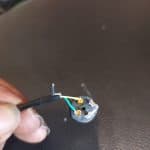
- Physical Hardware Inspection: When the digital path is clear, I know it’s time to check the physical path. Since I couldn’t hold the cable myself, I guided the client to physically inspect his gear. I asked him to carefully unscrew the casing of the XLR connector at the end of his headset cable and send me a photo of the inside.
- Identifying the Root Cause: From the photo, we found the true culprit: a loose connection inside the casing. The microphone had a broken solder connection.
The Result
While I can’t wield a soldering iron through the internet, identifying the true root cause was a massive relief for the client. It immediately saved him from wasting hours—or even days—frustratingly clicking through software menus that were never going to fix the issue. I explained that it was a very minor soldering job, and gave him the confidence to either easily repair it himself or hand it to a local repair shop. He left the session knowing exactly what was wrong and exactly how to proceed.
This article was originally published as a field case study on my sister site, Audio Support, and has been adapted for Amazing Audio.
Got a problem like this?
Send me a short clip and tell me what’s going on. I’ll reply in writing by the next UK working day, and it’s free.
Get a free diagnosis