
Case Study: HeyThereDaliah
- Client
- Daliah, a Twitch streamer
- Setup
- Elgato Wave Link, OBS, GTA V
- Problem
- Mic silent in OBS and game chat, and nothing in her headphones
- Fix
- Re-enabled the Wave Link headphone output and talked her through choosing the right Wave Link mic in OBS and GTA V
The Challenge
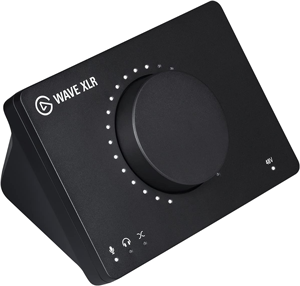
My client, a gaming streamer with the username HeyThereDaliah on Twitch, was experiencing audio issues with her Elgato Wave Link audio interface. Her microphone was not being picked up by OBS for her stream, nor by her in-game chat (specifically within GTA V’s FiveM container). This significantly hindered her ability to create content and interact with her audience.
The primary hurdle was correctly configuring the audio routing options within the Elgato Wave Link software, which includes a virtual mixer and VST effects. Additionally, the client needed to ensure her earbuds, plugged into the Wave Link’s headphone jack, were functional as a Windows playback device, and that her microphone with effects was correctly routed to both OBS and her game.
What I did
After the client reached out, we arranged a remote support session. I connected with the client via a phone call and used AnyDesk for the remote desktop connection, allowing me to diagnose her audio configuration problems methodically.
- Enabling Headphone Output: My first step was to address the client’s inability to hear audio through her Wave Link headphones. I navigated to Windows Sound Settings and found that the headphone output was disabled as a playback device. Enabling this allowed it to be selected as the default sound option, and a quick test confirmed audio was playing through her earbuds.
- OBS Microphone Input Configuration: With the headphone output resolved, we moved to OBS. I guided the client to select the “Wave Link Microphone with FX” as her primary audio input device for the stream.
- OBS Audio Monitoring Setup: In OBS’s audio settings, we set the default audio output to the Elgato Wave Link headphone output. This allowed the client to monitor her microphone audio (with effects applied by Wave Link) directly through OBS, confirming the correct input.
- In-Game Chat Integration (GTA V / FiveM): To ensure her microphone worked in-game, we launched GTA V within the FiveM container. I guided the client to select “Elgato Wave Link Microphone with FX” as the default input for voice chat, and the Elgato headphone output as the output. A system restart was required for the game to fully recognise these audio changes.
The Result
After the restart, the client entered a game server and successfully tested her voice chat, confirming that other players could hear her clearly and with her desired microphone effects.
She now had fully functional audio running both in and out of her headphones, directly through her Elgato Wave Link device. Crucially, she gained a clear understanding of the complex audio routing within her setup, empowering her to manage and troubleshoot these options confidently in the future. Her ability to stream and engage in in-game chat was fully restored.
Key Takeaways & Expert Insight
This case highlights a common challenge for streamers: bridging the gap between sophisticated audio hardware, virtual mixing software, and the varying audio demands of streaming platforms and games. It’s not just about selecting a microphone; it’s about understanding the entire signal chain.
- Virtual Mixers & OS Settings: Complex audio interfaces integrate deeply with the operating system. Overlooked OS sound settings can block crucial audio paths.
- Layered Configuration: Achieving optimal audio requires configuring not just OBS, but also the interface’s proprietary software and the game’s internal audio settings.
- Input/Output Precision: Carefully selecting the exact input/output devices (e.g., “microphone with effects“) is critical when using virtual mixers that offer multiple signal tap points.
Client feedback
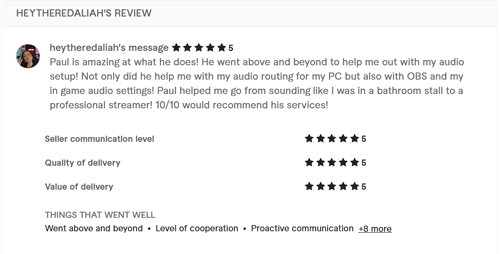
After the session, Daliah left this fantastic 5-star review:

“Paul is amazing at what he does! He went above and beyond to help me out with my audio setup! Not only did he help me with my audio routing for my PC but also with OBS and my in game audio settings! Paul helped me go from sounding like I was in a bathroom stall to a professional streamer! 10/10 would recommend his services!”
Got a problem like this?
Send me a short clip and tell me what’s going on. I’ll reply in writing by the next UK working day, and it’s free.
Get a free diagnosis